Settings Overview
The Settings page allows you to manage your organization's configuration, team access, and integrations. Access settings by clicking the gear icon in the top navigation bar.
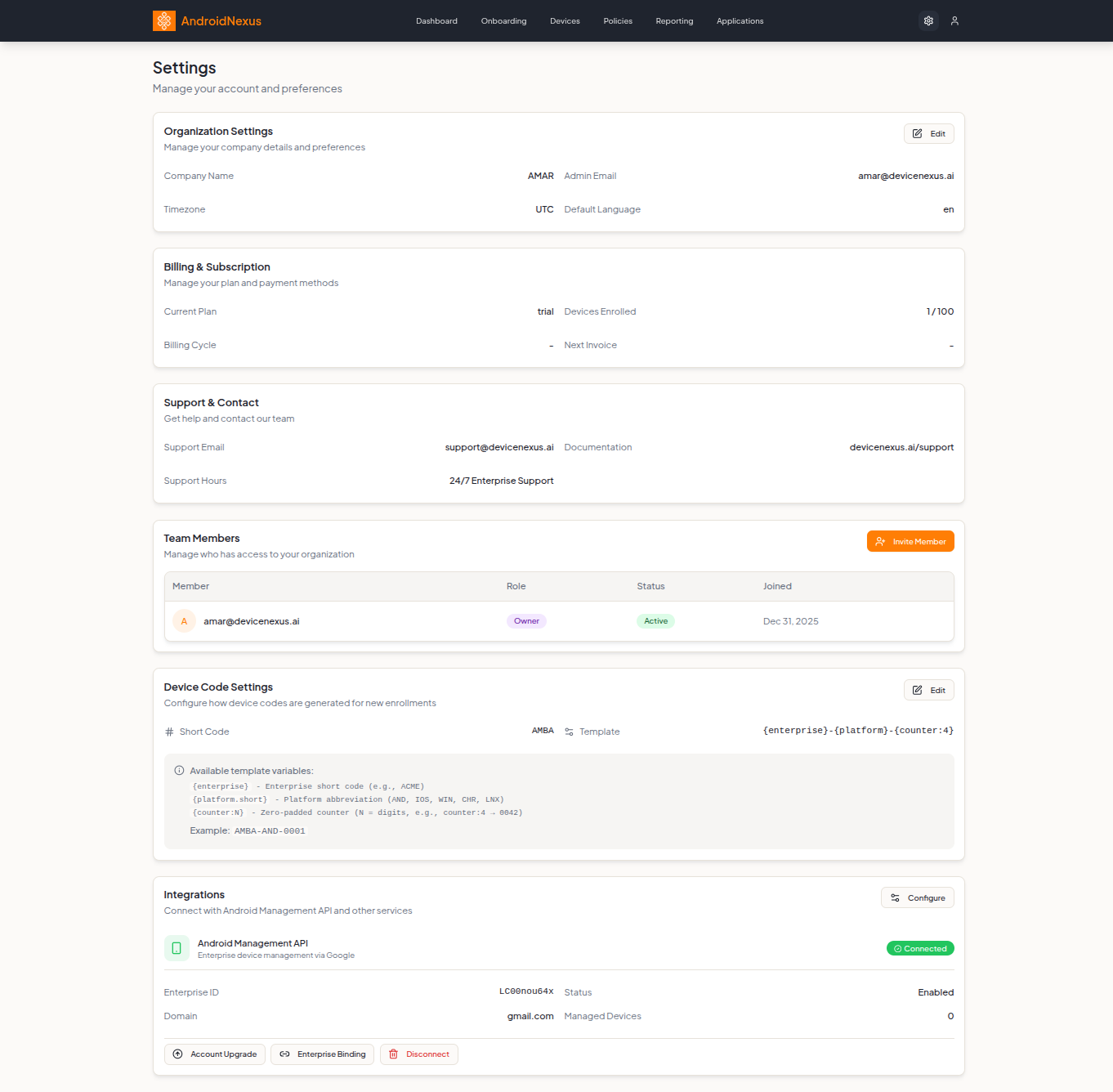
Organization Settings
Manage your company details and preferences.
| Field | Description |
|---|---|
| Company Name | Your organization's display name |
| Admin Email | Primary administrator email address |
| Timezone | Default timezone for reports and timestamps (e.g., UTC) |
| Default Language | Interface language (e.g., en) |
Click the Edit button to modify these settings.
Billing & Subscription
View and manage your plan and payment methods.
| Field | Description |
|---|---|
| Current Plan | Your subscription tier (e.g., trial, starter, enterprise) |
| Devices Enrolled | Current device count vs. plan limit (e.g., 1 / 100) |
| Billing Cycle | Monthly or annual billing period |
| Next Invoice | Date of next billing charge |
Support & Contact
Get help and contact information.
| Field | Description |
|---|---|
| Support Email | [email protected] |
| Documentation | https://docs.androidnexus.ai |
| Support Hours | 24/7 Enterprise Support |
Team Members
Manage who has access to your organization. Click the orange Invite Member button to add new team members.
The team members table shows:
| Column | Description |
|---|---|
| Member | User email with avatar initial |
| Role | Permission level (Owner, Admin, Member) |
| Status | Account status (Active, Pending, Inactive) |
| Joined | Date the member joined |
For detailed information about what each role can do, see Roles & Permissions.
Device Code Settings
Configure how device codes are generated for new enrollments.
| Field | Description |
|---|---|
| Short Code | Enterprise abbreviation (e.g., AMBA) |
| Template | Pattern for device codes |
Template Variables
Use these variables in your device code template:
| Variable | Description | Example |
|---|---|---|
{enterprise} | Enterprise short code | ACME |
{platform.short} | Platform abbreviation | AND, IOS, WIN, CHR, LNX |
{counter:N} | Zero-padded counter (N = digits) | counter:4 → 0042 |
Default Template: {enterprise}-{platform}-{counter:4}
Example Output: AMBA-AND-0001
Click the Edit button to customize your device code format.
Integrations
Connect with Android Management API and other services.
Android Management API
Enterprise device management via Google's official API.
| Field | Description |
|---|---|
| Status | Connection status (Connected shown in green) |
| Enterprise ID | Your Google enterprise identifier |
| Status | Enabled/Disabled |
| Domain | Associated Google domain |
| Managed Devices | Count of devices managed through AMAPI |
Integration Actions
| Button | Description |
|---|---|
| Account Upgrade | Upgrade to a managed Google domain |
| Enterprise Binding | Bind or rebind your enterprise |
| Disconnect | Remove the API connection (shown in red) |
Click the Configure button to manage integration settings.
Next Steps
- Roles & Permissions - Understand user access levels
- Device Management - Manage your device fleet
- Policy Configuration - Create and manage policies
- Quick Start Guide - Get started with AndroidNexus